

Your first 15 documents are free. Create a free account to save and download your invoices. Free support and an account manager come with every account. Need more time? Ask support to extend your trial.
An invoice generator for Saudi businesses must get four things right. Your VAT number. 15% VAT, totaled in riyals. Arabic text. And a ZATCA QR code. Miss one and the invoice does not meet ZATCA's rules.
This online invoice generator for Saudi Arabia covers all four. Fill in the form. The generator calculates VAT and totals in SAR. Switch on ZATCA e-invoicing in your settings, and every invoice you create afterward carries the QR code. Then download the PDF or send it to your client by email or WhatsApp.
It fits VAT-registered contractors, wholesalers, traders, distributors, agencies, consultants and freelancers.
Not VAT registered? You can still create an invoice online here. Leave out the VAT line and the QR code. Only a VAT-registered business can issue a tax invoice.
The invoice maker follows the order of a ZATCA tax invoice. You create an invoice online in six steps.
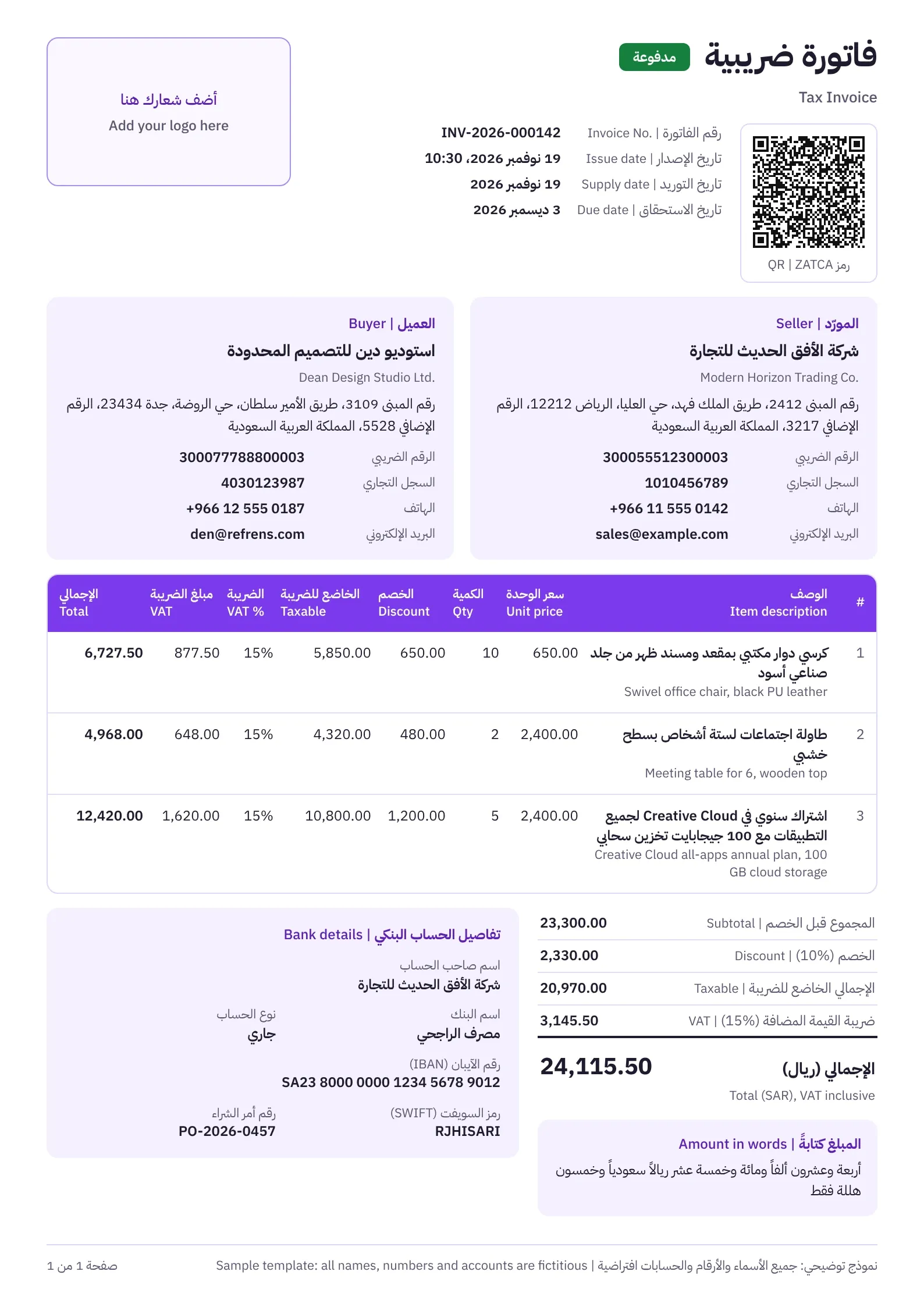
A ZATCA tax invoice must show the words Tax Invoice, a sequential number, the date, seller and buyer details, the items, VAT in SAR, and a QR code. A VAT invoice in Saudi Arabia is this same tax invoice. People use both names.
A standard tax invoice carries these fields:

Sample standard tax invoice in the Refrens layout. It shows Arabic and English labels, both VAT numbers, VAT in SAR and a ZATCA QR code. All names and numbers are fictitious.
A simplified tax invoice needs fewer fields: the date, seller name, address and VAT number, a description, and the total. It must also show the VAT amount, or state clearly that the total includes 15% VAT. It carries a QR code too.
VAT applies to the price after discounts. Take the discount first, then add 15%.
Source: ZATCA Guideline on VAT Invoicing and Records, version 3, May 2026. Rules last checked: November 2026. Read the full text in the ZATCA VAT invoicing guideline.
Issue a standard tax invoice to businesses and government customers. Issue a simplified tax invoice to consumers.
Phase 2 treats the two types differently. A standard invoice clears with ZATCA before your buyer receives it. You report a simplified invoice to ZATCA within 24 hours.
What if your buyer has no VAT number? Show one identifier from ZATCA's list, in this order: tax identification number, commercial registration, then a ministry license. The list continues with national ID, GCC ID, residency number and passport number.
Timing differs by type:
Here is how it looks in practice. A trading firm that sells to another VAT-registered firm issues a standard invoice. A consulting practice that bills an individual client SAR 1,150 issues a simplified invoice. That amount is SAR 1,000 plus SAR 150 VAT.
VAT registration decides which invoice you issue. A VAT-registered business issues a ZATCA tax invoice. A business without VAT registration issues a regular invoice. The invoice generator above makes both.
A ZATCA tax invoice carries these items:
You cannot edit or delete the invoice after you issue it. Fix mistakes with a credit note or a debit note.
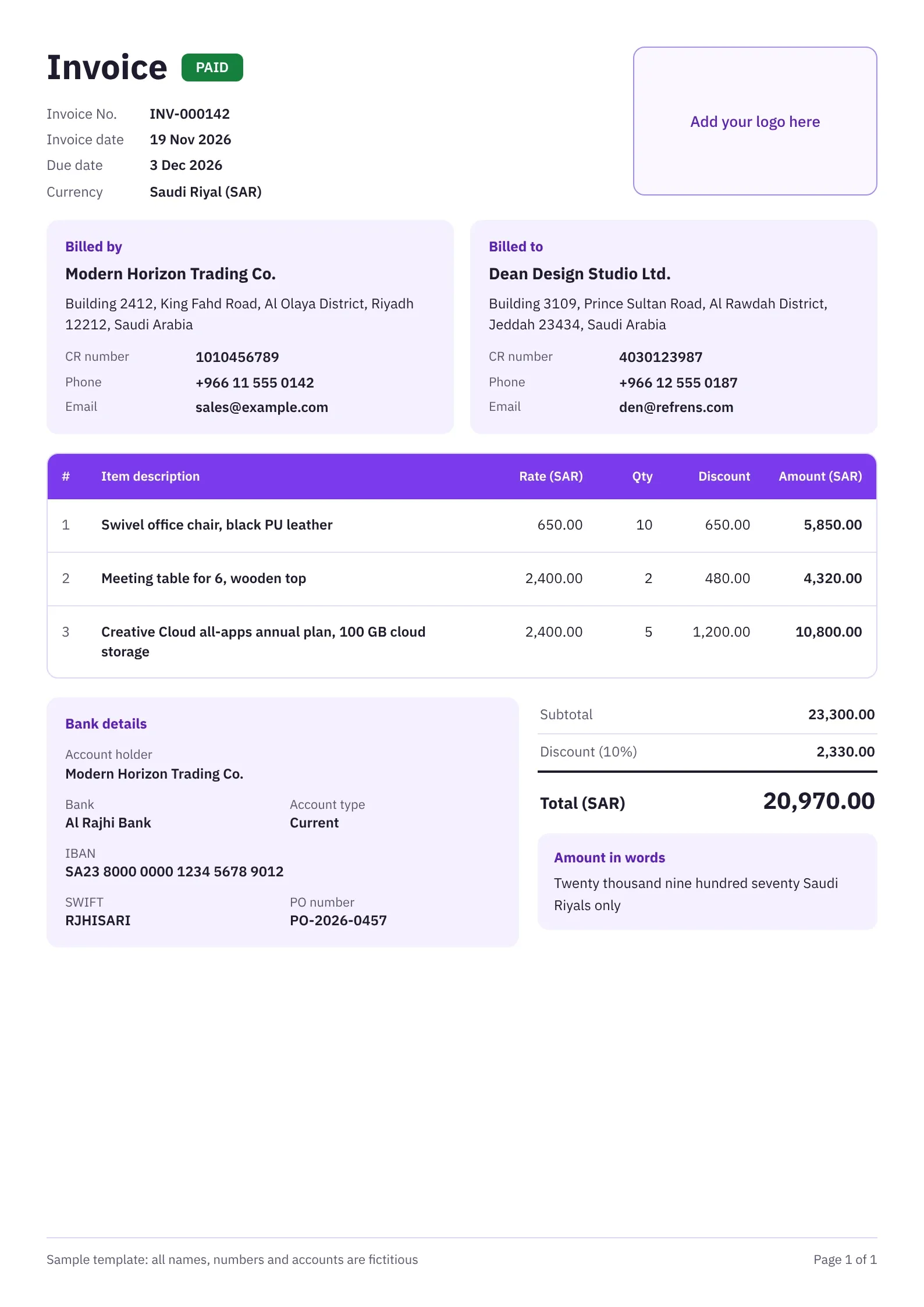
A business without VAT registration cannot issue a tax invoice. It issues a regular invoice. This one carries the title Invoice, an invoice number, a date, both business names, the items and the total. It has no VAT number, no VAT line and no QR code. You choose the language.

Sample regular invoice in the Refrens layout, for a business that is not VAT registered. It has no VAT line and no QR code. All names and numbers are fictitious.
A Riyadh trading company sells office furniture and software subscriptions to a design studio in Jeddah. The figures are illustrative.
With VAT registration, the company issues a ZATCA tax invoice. VAT at 15% adds SAR 3,145.50. The invoice total is SAR 24,115.50, and the invoice carries a QR code.
Without VAT registration, the company issues a regular invoice. The total stays at SAR 20,970. The invoice has no VAT line and no QR code.
VAT registered? Only the first version is valid. A registered business must issue a tax invoice with a QR code for every taxable supply. Phase 1 applies to every VAT-registered business in Saudi Arabia, even before ZATCA assigns it to a Phase 2 wave.
Every ZATCA tax invoice needs a QR code, standard and simplified. ZATCA's May 2026 guideline applies the QR code to standard invoices from January 2023.
The Phase 1 QR code holds five fields:
The invoice system packs these into a Base64 TLV code. TLV stands for tag, length and value. A buyer scans the code with the ZATCA app and checks the data.
The Phase 2 QR code holds nine tags. The extra fields carry cryptographic data. That data shows the invoice has not changed since you issued it.
You do not type any QR data. Refrens builds the code from your invoice. Set it up once:
Stuck on a step? Support helps you set it up.
A free ZATCA QR code generator online can make a Phase 1 code. It cannot make a Phase 2 code. Any invoice QR code generator free of charge, and any QR invoice generator that only encodes text, works the same way.
Here is why. A Phase 2 code carries a cryptographic stamp. On a simplified invoice, the seller applies the stamp with its own certificate from Fatoora onboarding. On a standard invoice, ZATCA applies the stamp when it clears the invoice. A plain QR tool has no certificate and no link to Fatoora. It cannot create the stamp.
Refrens covers both phases. In Phase 2, your invoices connect to ZATCA's Fatoora platform through Complyance.
The ZATCA invoice format depends on your phase. Phase 1 is the Generation Phase. Phase 2 is the Integration Phase.
Where do the waves stand? Waves 1 to 24 have passed their deadlines. Wave 24 covered revenue above SAR 375,000 and closed on 30 June 2026. Wave 25 covers VAT-subject revenue above SAR 187,500 in any of 2022, 2023, 2024 or 2025. Its deadline is 1 February 2027. ZATCA notifies each wave at least six months ahead. Read the announcement on ZATCA's Wave 25 page. Waves last checked: November 2026.
Not in a wave yet? Phase 1 applies to you today.
ZATCA calls its platform Fatoora. You will also see the spelling Fatoorah. Both mean the same platform.
Refrens is 100% ZATCA compliant. It supports ZATCA e-invoicing Phase 1 and Phase 2 through Complyance, and it connects to ZATCA's Fatoora platform.
Here is what that gives you:
How does this compare with other ways to invoice?
Refrens is the third kind. Create the invoice, switch on ZATCA e-invoicing, and send it to your client by email or WhatsApp.
Want the full set of ZATCA features, including Phase 2 setup? See Refrens ZATCA e-invoicing software.
ZATCA requires every invoice to be in Arabic. You can add another language beside it. If the two differ, the Arabic text prevails.
Refrens gives you three options: English only, Arabic only (right to left), or both on one invoice. VAT registered? Choose Arabic or both. English only suits invoices without VAT.
Prefer to work in Arabic? Open the Arabic invoice generator.
Currency follows set rules:
You can edit an invoice online any time before you issue it. After you issue it, ZATCA does not allow you to edit or delete it.
Fix a mistake with a credit note or a debit note. A credit note lowers the value of a supply. A debit note raises it. Each note must reference the original invoice number and supply date.
Keep one unbroken number sequence. Do not run separate sequences for branches or clients. ZATCA lists deleting or changing an issued e-invoice as a violation.
Standard rules cover most invoices. These cases need extra care. Each answer follows ZATCA's own guidelines.
A contractor charges VAT on each interim payment. A completion report is not a tax invoice. Retention does not reduce the VAT base, so you charge VAT on the full invoiced amount.
An example: a contractor bills a progress certificate of SAR 200,000. VAT at 15% is SAR 30,000, so the invoice total is SAR 230,000. The contract lets the client hold back 10% of the total, which is SAR 23,000. The client pays SAR 207,000 now. The contractor still declares the full SAR 30,000 of VAT.
The figures are illustrative. Your contract sets the retention terms. Read the ZATCA contracting sector guideline.
An advance payment needs a tax invoice. Issue it within 15 days after the end of the month you receive the money. Charge VAT on the earlier of the invoice date or the payment date.
Issue a tax invoice for every export. ZATCA zero-rates exports of goods outside the GCC. Keep your export and transport documents. ZATCA expects the evidence within 90 days of the supply. Without it, you charge 15%. See the ZATCA guideline on imports and exports.
By default, ZATCA zero-rates a service for a GCC client who benefits outside Saudi Arabia. A service that benefits someone in Saudi Arabia does not qualify.
When a VAT-registered business buys services from a supplier outside Saudi Arabia, it generally accounts for the VAT itself. It declares the output VAT and claims the input VAT in the same return. It normally does not issue a tax invoice for this. It keeps the supplier's invoice.
E-invoicing follows VAT registration, not the type of business. A VAT-registered freelancer issues tax invoices. An unregistered freelancer cannot issue a tax invoice.
Quoting before you invoice? Create the quote with the quotation generator. Then convert it to an invoice.
Saudi Arabia charges VAT at 15%. These are the rules behind every invoice.
An invoice is one step in a longer flow. These pages cover the rest.
A tax invoice is the invoice a VAT-registered business issues for a taxable supply. It shows the words Tax Invoice, a sequential number, seller and buyer details, the items, 15% VAT in SAR and a QR code. People also call it a VAT invoice.
A standard tax invoice goes to businesses and government customers. A simplified tax invoice goes to consumers. ZATCA guidance allows a simplified invoice for supplies below SAR 1,000, and for any sale to an individual not subject to VAT. A standard invoice clears with ZATCA first. You report a simplified invoice within 24 hours.
Yes. Both standard and simplified tax invoices carry a QR code. ZATCA's May 2026 guideline applies the code to standard invoices from January 2023. A simplified invoice has needed it since Phase 1 began in December 2021.
The Phase 1 QR code holds the seller name, the seller VAT number, the date and time, the invoice total with VAT and the VAT amount. The Phase 2 code holds nine tags. The extra tags carry cryptographic data that proves the invoice has not changed.
Phase 1 means you issue and store electronic invoices from a compliant system, with a QR code. Nothing goes to ZATCA. Phase 2 connects your system to ZATCA's Fatoora platform. Standard invoices clear with ZATCA first, and you report simplified invoices within 24 hours.
Waves 1 to 24 have all passed their deadlines. Wave 25 covers businesses with VAT-subject revenue above SAR 187,500 in any of 2022, 2023, 2024 or 2025. Its deadline is 1 February 2027. ZATCA notifies each business at least six months ahead.
Yes. Only a VAT-registered business can issue a tax invoice. Registration is mandatory above SAR 375,000 in taxable revenue and voluntary above SAR 187,500. A business that is not registered can issue a regular invoice with no VAT line.
Yes, if your business is not VAT registered. Create the invoice, leave out the VAT line and skip the QR code. A VAT-registered business cannot do this. It must issue a tax invoice with a QR code for every taxable supply.
Yes. ZATCA requires every invoice to be in Arabic. You can add another language beside it, and the Arabic text prevails if the two differ. Refrens offers English only, Arabic only (right to left) or both on one invoice. Choose Arabic or both for tax invoices.
No. ZATCA does not allow you to edit or delete an issued invoice. Correct it with a credit note or a debit note that references the original invoice number. You can edit an invoice online as often as you like before you issue it.
Issue a credit note when the value of a supply goes down. Reference the original invoice number and supply date, and label the document a credit note. Use a debit note when the value goes up. Credit notes cannot cover discounts unrelated to an earlier supply.
Keep invoices for at least six years from the end of the tax period. Store them in electronic form, in Arabic, inside Saudi Arabia. ZATCA sets longer periods for some assets, including real estate records at 15 years.
Yes. Refrens is 100% ZATCA compliant. It supports Phase 1 and Phase 2. It connects to ZATCA's Fatoora platform through Complyance. Enable ZATCA e-invoicing in your settings, and every invoice you create afterward carries the QR code.
Your first 15 documents are free. After that, you choose a plan. Support and your account manager are free, and support can extend your trial if you need more time to decide.
A VAT-registered business must issue invoices from a compliant electronic system. ZATCA says manual invoices are no longer tax compliant. A plain Word or Excel file has no QR code, no locked numbering and no stored record, so use a compliant invoice generator for tax invoices.