ZATCA Compliant E-Invoicing Software for Saudi Businesses
Refrens is e-invoicing software for Saudi Arabia that handles Phase 1 QR codes and Phase 2 clearance through Complyance, so your invoices meet ZATCA rules from the first one.
What you get:
- ZATCA compliant e-invoices in minutes, in SAR with 15% VAT, in Arabic or English.
- Avoid penalties with automated data validations.
- Highly Trusted. Reliable. Secured. 100% KSA Compliant e-Invoice.
- Quotes, proforma invoices, invoices, credit notes and debit notes in one place.
Built for Saudi Arabia
ZATCA compliant. Phase 1 and Phase 2 e-invoicing, with a QR code on every new invoice.
ISO certified. Refrens holds ISO/IEC 27001:2022 certification.
Safe, secure and reliable. Roles and permissions control who can see and change documents. Refrens archives every e-invoice and never deletes it.
Rated by users worldwide.
Saudi businesses that use Refrens for ZATCA e-invoicing:
Swipe to see more →






Saudi Aramco verified vendors that use Refrens for invoicing:
Swipe to see more →



How ZATCA E-Invoicing Software Works in Refrens
Refrens is a ZATCA e-invoicing system you run from your browser. It takes three steps.
- 1
Create the invoice.
Pick a customer. Add items. Refrens fills in your saved details and works out 15% VAT.
- 2
Get the QR code and clear the invoice.
Phase 1 adds a QR code when you save. Phase 2 sends the invoice to ZATCA through Complyance. Standard invoices are cleared. Simplified invoices are reported within 24 hours, and Refrens does that automatically.
- 3
Share the invoice.
Send a cleared invoice by link, PDF, print, email or WhatsApp.
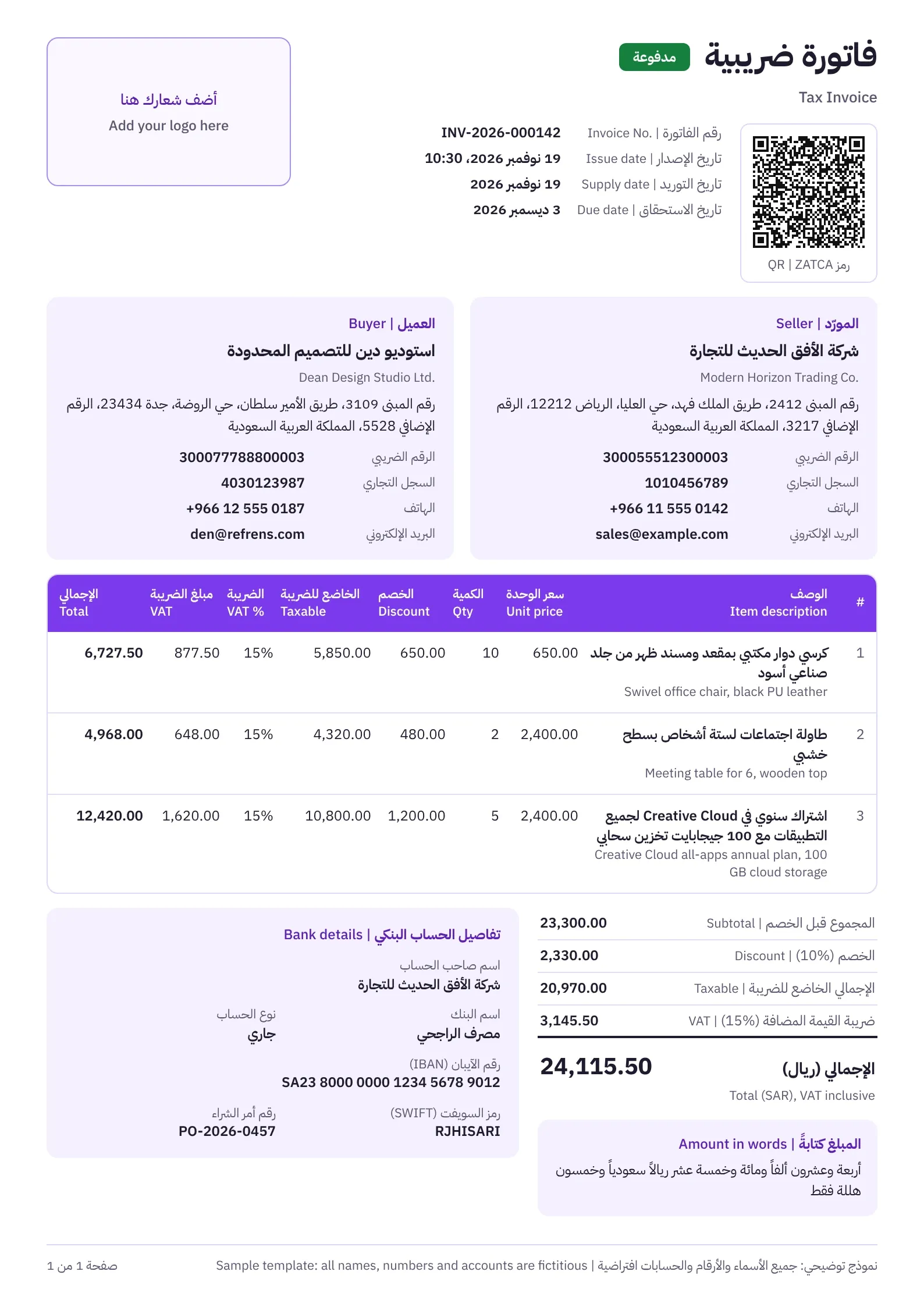
Pick an invoice template that carries the fields a ZATCA e-invoice needs: seller and buyer details, VAT lines and the QR code. You control whether the QR code shows on your documents. Read how in the Refrens help article on adding QR codes to documents.
Secure ZATCA E-Invoicing Software: Data Checks, Locks and Archives
ZATCA expects software to protect invoices from errors and tampering. Refrens works as e-invoice compliance software in these ways.
Data checks before you generate
Refrens validates your invoice data before you generate the e-invoice. Missing IDs, incomplete addresses and wrong details show up at the form, where they are easy to fix. A check cannot cover every ZATCA rule, so a rejection can still happen. Read the section on rejections below.
No tampering
Turn on Lock Invoice Edits in Business Settings, ZATCA E-invoicing. A generated e-invoice then stays as it was issued. You change an issued invoice with a credit note or a debit note. ZATCA treats deleting or amending an issued e-invoice as a violation. Read how the lock works in the Refrens help article on locking invoice edits.
No unauthorized access
Add team members and set roles and permissions. You decide who can create, view and change invoices. Run more than one business from one login.
Bulk e-invoicing
Generate e-invoices in bulk when you bill many customers at once, such as the end of a rental or service month.
E-invoice adjustments
Turn an invoice into a credit note or a debit note in one click. Standard notes are cleared. Simplified notes are reported within 24 hours.
Recurring invoices
Set up retainers, rentals and monthly services to repeat on your schedule.
Transaction archive
Refrens archives every e-invoice in your account and never deletes it. You can download any of them as a ZATCA PDF.
Fully cloud
Refrens runs in your browser, with Android and iOS apps. Nothing to install and no server to maintain.
Share the right way
Send a standard invoice to your customer only after ZATCA clears it. Then share the cleared invoice by link, PDF, email or WhatsApp.
Refrens E-Invoice Regulatory Compliance: What the Marks Mean
Here is how we look at compliance. ZATCA writes the rules, and a business is compliant when its software follows them. These are the systems and rules Refrens works with:
Phase 2 invoices go to ZATCA's Fatoora platform.
Clearance for standard invoices. Reporting for simplified invoices.
A QR code on every invoice, credit note and debit note.
Calculated on every item.
Refrens sends your Phase 2 invoices to ZATCA through Complyance, an e-invoicing provider.
What Does ZATCA Phase 2 Require?
Every e-invoice in Saudi Arabia is either cleared or reported. Phase 2 requires a Saudi business to connect its invoicing software to ZATCA. Standard invoices are cleared before they go to the customer. Simplified invoices are reported within 24 hours.
Two phases, in plain words:
Phase 1 (Generation Phase), from 4 December 2021.
You issue invoices from a compliant electronic system. Each carries a QR code. You store the electronic copies. You do not report to ZATCA.
Phase 2 (Integration Phase), from 1 January 2023.
Your software connects to ZATCA. ZATCA brings in businesses in waves.
The current waves:
Integration by 30 June 2026. It covered businesses with VAT-subject revenue above SAR 375,000 in 2022, 2023 or 2024.
Deadline passedIntegration by 1 February 2027. It covers businesses with VAT-subject revenue above SAR 187,500 in any year from 2022 to 2025. ZATCA announced it on 24 July 2026. Read the ZATCA announcement.
Next deadlineZATCA tells each business at least six months before its deadline. We found no announcement of a Wave 26 as of 20 November 2026.
Six months' noticeWhat your software must do:
- Send each invoice to ZATCA as an XML file, not a PDF.
- Give every invoice a unique ID and a counter number that is never reused.
- Link each invoice to the one before it, so the invoices form one unbroken chain.
- Stamp each invoice with a cryptographic stamp and add the QR code.
- Block editing and deleting of issued invoices. You correct with a credit or debit note.
- Keep an archive of every invoice.
Clearance and reporting:
go to ZATCA before they go to your customer. The invoice is valid only after ZATCA clears it.
are reported to ZATCA within 24 hours of creation. You can hand them to the customer right away.
follow the type of the original invoice.
To connect, you get a one-time password (OTP) from ZATCA's Fatoora portal. It works for one hour. You enter it in your software.
Who has to follow Phase 2, and how Phase 1 and Phase 2 differ for a free generator, are covered on the Saudi invoice generator page.
How to Connect Refrens to ZATCA
Phase 1 takes one toggle. Phase 2 uses a free Complyance account.
Phase 1.
Business Settings → ZATCA E-invoicing → Toggle on
Open Business Settings, then ZATCA E-invoicing, and turn on the toggle. Refrens adds the QR code to every new invoice, credit note and debit note.
Phase 2.
Complyance sign-up → API keys → OTP → Paste keys
Sign up for a free Complyance account from the same settings page. Generate your API keys, onboard with the OTP from the Fatoora portal, and paste the keys into Refrens.
Your first e-invoice.
Save → Generate E-invoice → Generate
Save a document, click Generate E-invoice, check the details and click Generate.
The full steps with screenshots are in the Refrens help article on generating ZATCA compliant e-invoices.
Information You Need to Create a ZATCA E-Invoice
Most rejections come from missing or wrong details. Collect these before you generate.
Billed By (your business).
Your VAT number and one additional ID. If you add only a VAT number, ZATCA clears the invoice with a warning.
Billed To (your customer).
A VAT number or an additional ID.
Additional ID types.
NAT, TIN, IQA, PAS, CRN, MOM, MLS, SAG, GCC or OTH. Refrens uses one additional ID for e-invoicing. Tick "Use for E-invoice" on the ID you want.
- Individual customers. Set the client type to Individual for a B2C sale.
- Addresses. Fill in the address fields for both sides.
- VAT category. Pick the right category for each item. Add a reason where one applies.
- Characters. Use Arabic or English letters, digits and basic punctuation such as commas, hyphens and periods. Emojis, accent marks, semicolons and unusual symbols cause errors.
- Equipment hireSAR 20,000
- DeliverySAR 5,000
- SubtotalSAR 25,000
- VAT at 15%SAR 3,750
- Billed By: VAT no. + additional IDComplete
- Billed To: VAT no.Complete
Illustration: a machinery supplier bills a contractor SAR 20,000 for equipment hire and SAR 5,000 for delivery. The subtotal is SAR 25,000. VAT at 15% is SAR 3,750. The total is SAR 28,750. Both parties have a VAT number, and the supplier added an additional ID, so Refrens clears the invoice without a warning.
The VAT number format is covered on the generator page linked above.
ZATCA E-Invoice Automation: Automatic QR Code, VAT and VAT Reports
You set up e-invoicing one time. After that, each invoice runs on the same settings.
VAT calculated for you.
Refrens works out 15% VAT on every item.
One-time setup.
Connect once. Each e-invoice you generate afterward uses the same connection.
QR code added automatically.
Every new invoice carries the QR code.
Saved templates, customers and items.
Your next invoice starts filled in.
VAT report from the same records.
Accounting Reports → Other Reports → VAT Return Report
Open Accounting Reports, then Other Reports, then VAT Return Report. Pick a period. Refrens shows output tax, input tax and net VAT payable, compiled from your invoices, expenses and other documents. Download it as a PDF. Read the Refrens help article on the VAT Return Report.
Refrens compiles the VAT Return Report for Saudi businesses automatically from invoices, expenses and other documents, and shows output tax, input tax and net VAT payable for a chosen period.
What to Do When ZATCA Rejects an E-Invoice
A rejection means ZATCA found a problem. Fix the problem. Then generate the e-invoice again.
Check the Billed By and Billed To IDs first.
Check addresses, VAT categories and characters next.
A VAT number alone in Billed By does not cause a rejection. It clears with a warning.
ZATCA does not reuse the unique ID of a rejected invoice, and each resubmission gets a new counter number. For an outage on your side or ZATCA's, use ZATCA's E-Invoicing Failure Notifications service, then resume issuing invoices.
Send a Proforma Invoice First to Avoid Rejected ZATCA E-Invoices
At Refrens, we send a proforma invoice before the tax invoice. We recommend that the businesses using Refrens do the same.
Here is why. A cleared e-invoice is locked. If a name, a VAT number or a total is wrong after that, you fix it with a credit note and a new invoice, not an edit. A proforma lets your customer check those details first, while a change is still cheap.
Here is how we work:
- 1Send the proforma. Share it with your customer on WhatsApp or email.
- 2Fix the details. Agree names, VAT numbers, items and totals before anything goes to ZATCA.
- 3Convert it. When the details are final, convert the proforma into the tax invoice.
- 4Generate the e-invoice. Then generate the ZATCA e-invoice.
This does not remove every error. ZATCA also checks format rules, such as characters, IDs and VAT categories.
Mind the deadline.
Tax is due on the earliest of delivery, invoice or payment. A tax invoice is due within 15 days after the end of the month of supply, even if the customer has not paid.
- Prepaid and advance-payment jobs. The tip fits well. Payment arrives before supply. The invoice for the amount received is due within 15 days after the end of the month you receive it.
- Work delivered on credit. Issue the tax invoice by the deadline. Do not wait for payment.
Illustration (dates only): a trading company receives an advance on 10 November. The month ends on 30 November. The tax invoice for the amount received is due by 15 December. If the company delivers goods on credit on 25 November, the tax invoice is also due by 15 December.
A proforma invoice lets a Saudi business agree names, VAT numbers, items and totals with a customer before it generates the locked ZATCA e-invoice.
The E-Invoicing Provider Behind Refrens
An e-invoicing provider connects your software to ZATCA. It handles onboarding and sends your invoices for clearance and reporting.
Where to find it
Refrens connects to ZATCA through Complyance. Its partner Cutech Arabia LLC appears in ZATCA's Solution Providers Directory, with a Phase One listing, checked 20 November 2026.
ZATCA website → E-Invoicing → Solution Providers → Cutech Arabia LLC
To find it, open the ZATCA website, go to E-Invoicing, then Solution Providers, then search for Cutech Arabia LLC. Refrens does not appear in the directory under its own name. Read the Refrens help article on finding Refrens on the ZATCA portal.
ZATCA calls its directory a guide and says it is not an approval of providers' solutions. ZATCA also says a business whose software meets the requirements is compliant even if the provider is not listed.
What stays with you:
Built for Saudi Businesses: Use E-Invoicing Only, or the Full System
E-invoicing only
You do not need to move your books to Refrens. If all you want is ZATCA e-invoicing, add your business, your VAT number and your customers. Create invoices and connect to ZATCA. Your first 15 documents each year are a free trial of every feature, including live e-invoice clearance.
The full system
When you want more, Refrens grows with you. Add quotes, purchase orders, inventory and accounting later.
Refrens fits:
Contracting and construction businesses.
Trading, wholesale and distribution businesses.
Machinery and equipment suppliers.
Service businesses and knowledge services firms, including IT, consulting and engineering services.
Agencies, freelancers and professional practices.
Refrens does not run a shop counter. Retailers and businesses that need a POS should use a system built for that.
What Else Refrens Provides
E-invoicing is one part. Refrens also gives you:
Sales CRM. Track leads and customers.
Quotes. Send a quote and convert it into an invoice. See quotation software and the quotation generator.
Billing. Use Refrens as ZATCA billing software. Invoices, payment receipts and reminders sit in one place.
Invoices. Read about invoicing software.
Purchase orders. Use the purchase order form.
Delivery notes. Use the delivery note template.
Templates. Browse quote templates.
Inventory. Stock updates when you invoice or record an expense.
Approvals and workflows. Set approval steps with amount limits.
Accounting. See accounting software.
VAT reports and custom reports. See VAT and your own numbers in one place.
AI. Create and send invoices from WhatsApp without opening the software. Connect Refrens to Claude and ChatGPT through Refrens MCP.
Expense management and OCR scanning. Track expenses and scan bills into records.
Start from the Refrens Saudi Arabia homepage for the full list.
Tax and Legal Questions About ZATCA E-Invoicing (FAQ)
This section is general information. It is not tax or legal advice. Check ZATCA or a tax adviser for your case.
Is there ZATCA approved e-invoicing software?
No. ZATCA publishes a Solution Providers Directory as a guide. It says the list is not an approval of the providers' solutions. A business is compliant when its software meets ZATCA's requirements, even if the provider is not on the list. Refrens connects to ZATCA through Complyance. Its partner, Cutech Arabia LLC, appears in the directory with a Phase One listing as of 20 November 2026.
When can I send an e-invoice to my customer in Phase 2?
For a standard (B2B) invoice, after ZATCA clears it. The invoice is valid only once cleared. For a simplified (B2C) invoice, you report it to ZATCA within 24 hours of creating it. You can give it to the customer right away.
What happens if ZATCA rejects my e-invoice?
Fix the problem and generate the e-invoice again. In Refrens the usual causes are an unsupported character, a missing ID or an incomplete address. ZATCA does not reuse the unique ID of a rejected invoice, and each resubmission gets a new counter number. A VAT number alone in Billed By clears with a warning, not a rejection.
What do I need before I connect my software to ZATCA for Phase 2?
You need your VAT registration, access to ZATCA's Fatoora portal and software that connects to ZATCA. In the portal you request a one-time password (OTP) for each solution unit and enter it in the software. The OTP works for one hour. In Refrens you also sign up with Complyance and generate API keys first.
How long does my Phase 2 certificate last?
Up to five years (60 months), according to ZATCA's security standard. The Fatoora portal reminds you before it expires. You then request renewal with new OTPs and enter them within an hour. Ask your provider whether it handles renewal for you.
What if my internet or ZATCA's system is down?
Report the problem through ZATCA's E-Invoicing Failure Notifications service. Resume issuing invoices when you can. Then send the invoices you issued during the outage to ZATCA promptly. Keep a record of what happened.
Can I send a proforma invoice first and issue the tax invoice later?
Yes. Send the proforma first, agree the details with your customer, then issue the tax invoice. The tax invoice still has a deadline. Tax is due on the earliest of delivery, invoice or payment. The invoice is due within 15 days after the end of the month of supply. If the customer pays before you deliver, the invoice for the amount received is due within 15 days after the end of the month you receive it. Convert the proforma into the tax invoice by then.
What fines apply for e-invoicing violations?
ZATCA's notice of 16 November 2021 lists SAR 5,000 for not issuing e-invoices and SAR 10,000 for deleting or amending an e-invoice after issuing it. Some violations start with a warning, and fines rise for repeats. Other sources give different ranges, and Phase 2 amounts are not stated in that notice. Check ZATCA for the current schedule.
Can I keep my e-invoices in the cloud?
ZATCA allows storage on a server or in the cloud. Cloud storage must give ZATCA a direct link to the data, and you must be able to export invoices to an external archive. Refrens archives every e-invoice in your account, never deletes it, and lets you download each one.
Do credit and debit notes go through ZATCA too?
Yes. A note follows the type of the original invoice. A note for a standard invoice is cleared. A note for a simplified invoice is reported within 24 hours. It must reference the original invoice. To change an issued invoice, you issue a note instead of editing it.
Frequently Asked Questions
What is ZATCA e-invoicing software?
It is software that creates invoices in ZATCA's format and connects to ZATCA's systems. In Phase 1 it adds a QR code. In Phase 2 it sends invoices to ZATCA for clearance or reporting.
Is Refrens ZATCA compliant?
Yes. Refrens supports Phase 1 and Phase 2 e-invoicing through Complyance. Refrens works with ZATCA's rules and systems. ZATCA does not issue an approval to software, so treat any claim of ZATCA approval with care.
Does Refrens support Phase 1 and Phase 2?
Yes. Phase 1 adds a QR code to every new invoice, credit note and debit note. Phase 2 sends standard invoices for clearance and reports simplified invoices within 24 hours.
How do I turn on e-invoicing in Refrens?
Open Business Settings, then ZATCA E-invoicing. Turn on the toggle for Phase 1. For Phase 2, sign up with Complyance, get your API keys and paste them into the same settings.
Do I need my own Complyance account?
Yes, for Phase 2. You sign up for a free Complyance account from Refrens ZATCA E-invoicing settings and generate your API keys there.
What are Sandbox, Simulation and Production?
Sandbox uses dummy company data and dummy e-invoices. Simulation uses your real company data with dummy e-invoices. Production creates real e-invoices. Test in Sandbox first, then move to Production.
Which IDs do I need on an e-invoice?
Billed By needs your VAT number and one additional ID. Billed To needs a VAT number or an additional ID. The ID types are NAT, TIN, IQA, PAS, CRN, MOM, MLS, SAG, GCC and OTH.
Why did my e-invoice fail because of special characters?
ZATCA accepts Arabic or English letters, digits and basic punctuation such as commas, hyphens and periods. Emojis, accent marks, semicolons and unusual symbols cause errors. Remove them and generate again.
How do I issue an e-invoice to an individual customer?
Set the client type to Individual. Complete the addresses on both sides, and pick the VAT category for each item. Then generate the e-invoice.
Can I use Refrens only for e-invoicing?
Yes. Add your business, your VAT number and your customers, create invoices and connect to ZATCA. You do not need to move your accounting to Refrens.
Is there a free trial for e-invoicing?
Yes. Your first 15 documents each year are free, across all document types. Use every feature in that trial, including live e-invoice clearance. After that, choose a paid plan on the Refrens Premium page.
Can I send an e-invoice on WhatsApp?
Yes. Send a cleared invoice on WhatsApp or by email. You can also create and send invoices from WhatsApp without opening the Refrens software.
Start Using ZATCA E-Invoicing Software That Fits Saudi Businesses
Refrens is e-invoicing software for Saudi Arabia that covers Phase 1 and Phase 2 through Complyance. Set it up once. Test it in Sandbox. Then issue ZATCA compliant e-invoices in SAR with 15% VAT.
Create your first e-invoice free Your first 15 documents each year are free. Try every feature, including ZATCA e-invoicing. No credit card.